Acumatica accounts payable automation
How to Process Vendor Invoices Automatically in Acumatica
Read vendor invoices from email, match the purchase order, create the receipt and bill, and keep the audit trail inside Acumatica.
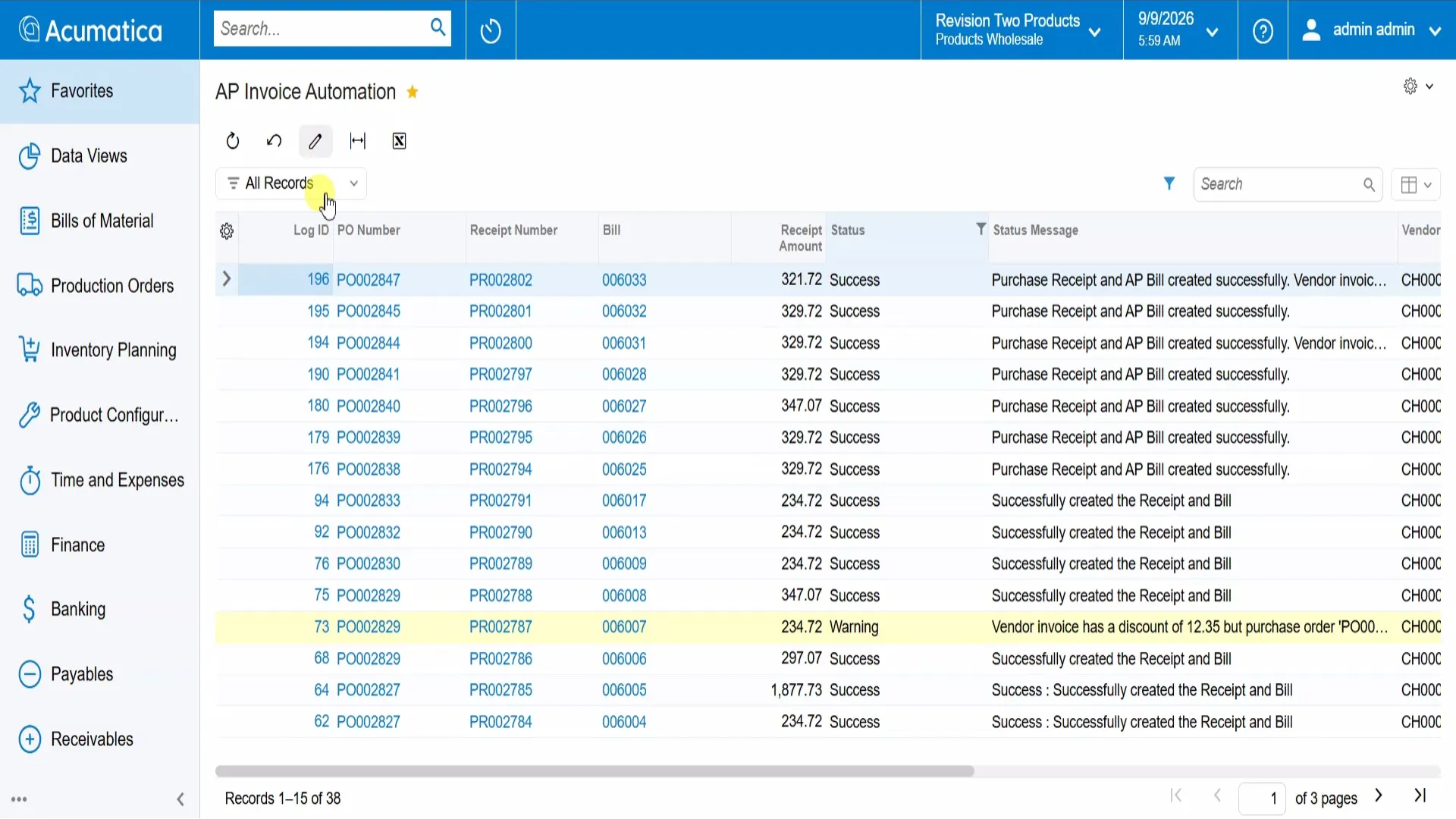
How can you automate vendor invoice processing in Acumatica?
Envinse AP Invoice Automation monitors a configured email inbox, extracts invoice data from PDF attachments, matches the referenced purchase order, and creates the purchase receipt and AP bill. It records document links and processing details, handles invoice discounts in the configured workflow, and leaves the bill on hold for AP review.
Accounts payable is one of those jobs that is never finished. Invoices arrive by email all day, and each one means opening a PDF, finding the purchase order, checking the lines, keying a receipt, creating a bill, and reconciling any discount that was not on the original order. It is repetitive work where small mistakes can hide.
Envinse builds AP Invoice Automation into Acumatica to remove manual entry from that process. This walkthrough follows the demonstrated workflow from the incoming email to the bill awaiting review.
It Starts When an Invoice Lands in the Inbox
The trigger is a vendor emailing an invoice to the monitored inbox. The automation identifies the attached invoice and starts processing, so AP does not have to notice the PDF and begin keying it manually.
The AP Invoice Automation log gives the team one place to see what has been processed. Purchase order, receipt, and bill references sit beside the amount, status, and processing message. Staff can follow the linked documents and investigate warnings from the same view.
The Data Comes From the PDF
The automation extracts invoice data from the PDF and matches it to the referenced purchase order. It checks invoice items, quantities, and prices against the PO before the configured receipt-and-bill workflow proceeds.
This turns the original vendor document into usable Acumatica data without asking someone to retype each line.
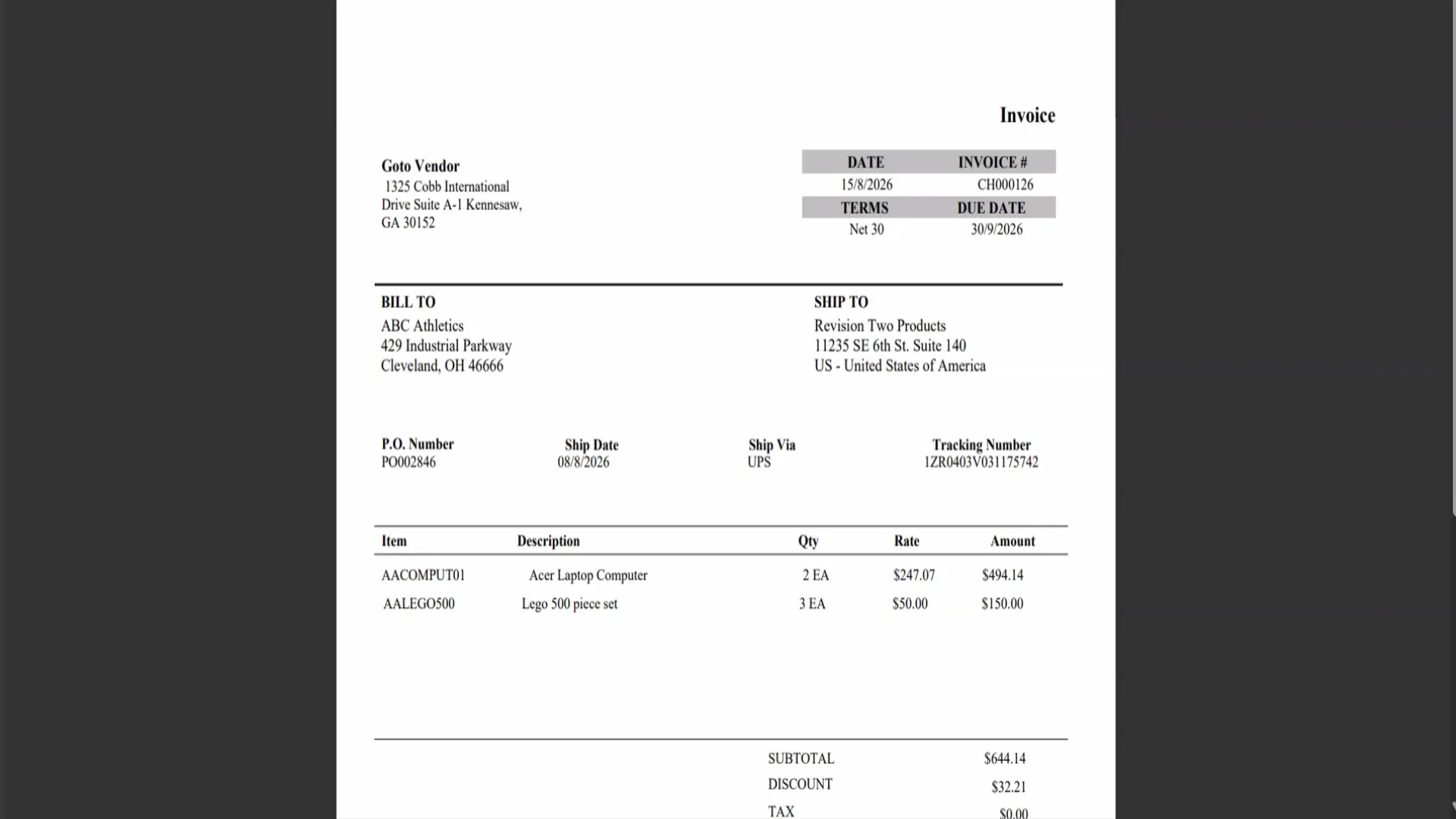
The Receipt and Bill Are Created Automatically
Once matching succeeds, the demonstrated workflow creates and releases the purchase receipt, updates inventory, and creates an AP bill for the invoice amount. Where receiving is complete, the purchase order moves to Completed.
The receipt and bill receive their own document numbers, which are recorded in the automation log with the processing result. AP can open either document without searching for the invoice again.
Vendor Discounts Stay in the Reconciliation
A discount on the vendor invoice may not appear on the original purchase order. In the demonstrated configuration, the automation adds that discount to the AP bill as a separate line using the configured non-stock discount item.
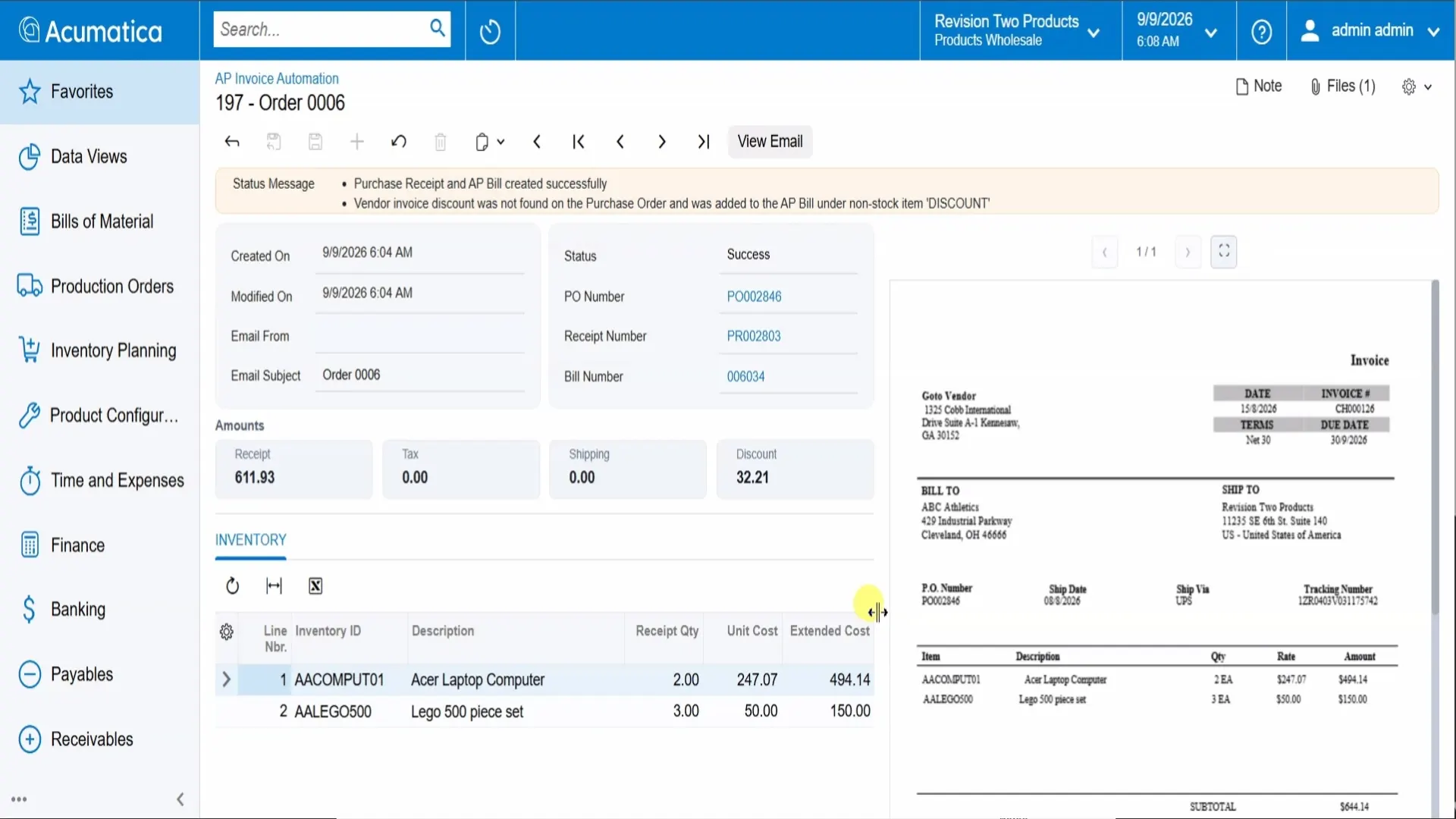
The status message records that the discount was not found on the PO and explains how it was added to the bill. This makes the adjustment visible when AP checks the invoice total.
Each Invoice Keeps Its Processing Record
The processing record retains email details, processing timestamps, linked document numbers, and status messages. The original invoice appears beside the extracted inventory lines and amounts, so reviewers can compare the source document with the data used to create the receipt and bill.
AP Reviews the Bill Before Payment
The finished AP bill is populated with the vendor, terms, due date, vendor reference, and configured account mappings. It remains on hold so the AP team can review the document before releasing it through the business's approval and payment process.
Receipt creation, bill creation, and payment are distinct steps. This workflow automates document entry while keeping final bill review with the team.
Why the Whole Workflow Matters
Instead of keying every invoice, AP reviews documents that have already been extracted, matched, and linked. The team can spend less time on entry, check discount adjustments, and trace a bill back to its email and source PDF inside Acumatica.
Envinse configures the workflow around the business's invoice intake, purchasing, receiving, account mapping, and review requirements. Explore our AI solutions for Acumatica for related document automation and workflow services.
AP Invoice Automation for Acumatica
Frequently Asked Questions
How does the automation get the invoice?
Envinse AP Invoice Automation monitors the configured email inbox and reads invoice data from attached PDFs, removing manual upload and entry from that workflow.
Does it work with our purchase orders?
It matches each invoice to its referenced purchase order and checks items, quantities, and prices before creating the receipt and bill in the configured workflow.
What happens to discounts that are not on the PO?
In the demonstrated configuration, a vendor invoice discount missing from the PO is added to the AP bill as a separate discount line, and the action is recorded in the status message.
Does it pay invoices automatically?
No. The workflow creates the AP bill and leaves it on hold for the AP team to review. Payment follows the business's approval and payment process.
Is there an audit trail?
The processing record includes email details, processing time, linked PO, receipt and bill numbers, status messages, and the original invoice alongside extracted data.
Take the Data Entry Out of AP
Tell us how vendor invoices arrive, how you receive purchases, and how AP reviews bills. We will map the automation around your workflow.
Talk to Envinse About AP Invoice Automation →