Acumatica integration how-to
How to Automate Post-Sale Customer Feedback in Acumatica
Connect SurveyFill with Acumatica so post-sale surveys send automatically and AI-analyzed responses return to the sales order where your team already works.
How do you automate customer feedback in Acumatica?
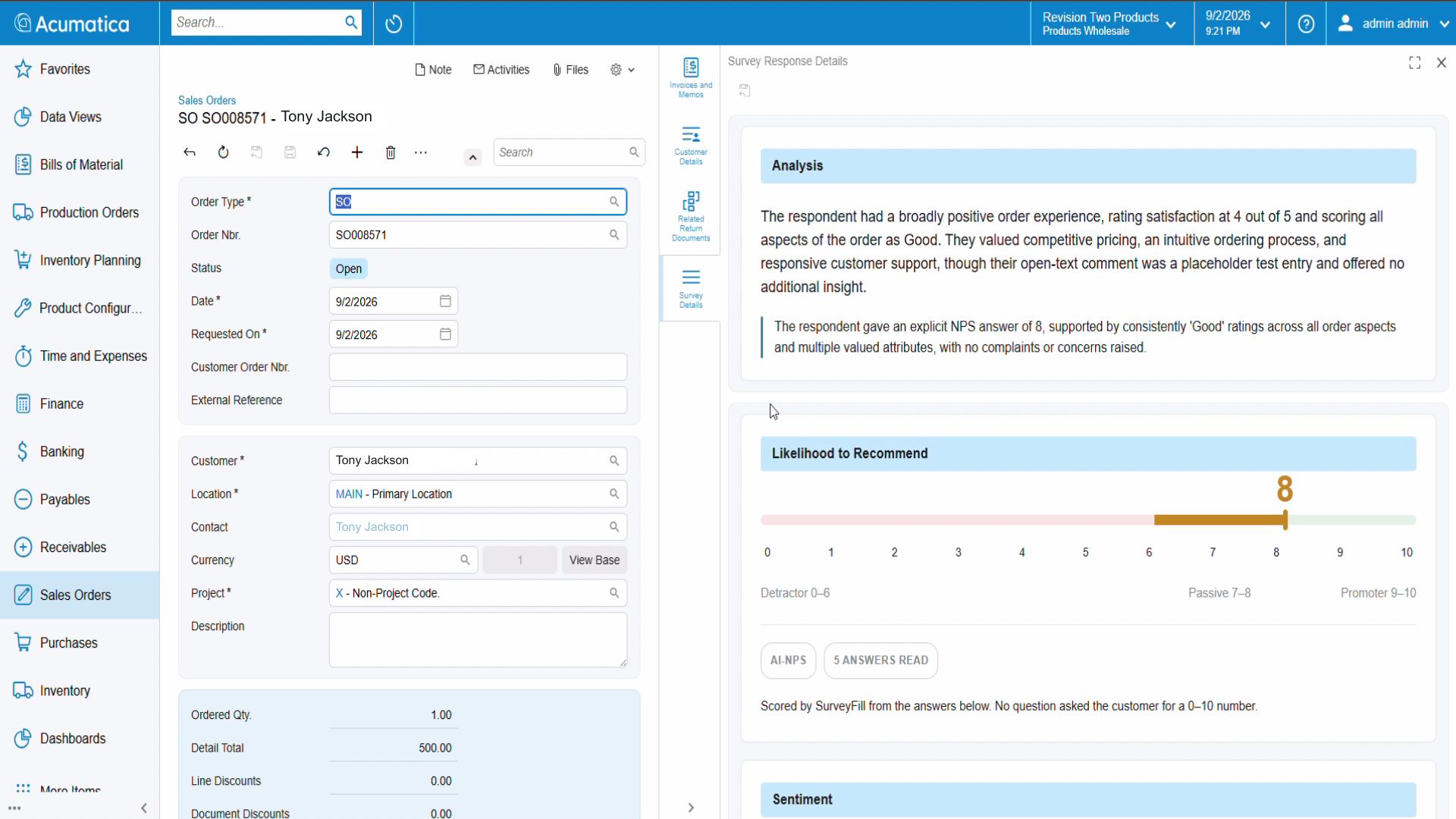
Connect Acumatica to SurveyFill with a secure webhook, choose an ERP event such as Order Created, map a survey to that event, and map its answers back to the Acumatica record. The survey sends automatically; when the customer responds, the answers, AI summary, NPS score, themes, and suggested actions appear on the originating sales order.
Most businesses collect customer feedback the hard way. Someone remembers to send a survey days after an order ships, pastes a link into an email, and - if a response ever comes back - copies the answers into a spreadsheet that no one on the sales team ever opens. The insight arrives late, lives outside the ERP, and rarely turns into action.
It does not have to work that way. By connecting SurveyFill with Acumatica, Envinse turns feedback into an automatic part of the order lifecycle: a survey goes out when the selected order event occurs, the customer responds, and an AI-analyzed summary lands back on the sales order. There is no manual follow-up and no separate tool for the sales team to check.
Watch the SurveyFill + Acumatica Integration
The Problem: Acumatica has no native survey or form tool. Collecting customer feedback, field inspection data, or vendor onboarding information means using disconnected tools that never sync back to Acumatica records.
The Solution: Create customer satisfaction surveys, field inspection forms, vendor onboarding questionnaires, and feedback forms in SurveyFill. Responses appear in the SurveyFill web app and sync directly to Acumatica records.
The Problem With Disconnected Feedback
Feedback creates value only when the right person sees it in time to act. The usual approach breaks down in three places:
- It is manual. Surveys depend on someone remembering to send them, so delivery is inconsistent.
- It is disconnected. Responses sit in a survey tool, separate from the customer and order they describe.
- It is slow to read. Even when responses arrive, someone has to interpret them before useful action can happen.
Automation fixes all three: surveys fire on their own, responses attach to the originating record, and AI performs the first read.
Step 1: Build the Survey in Minutes
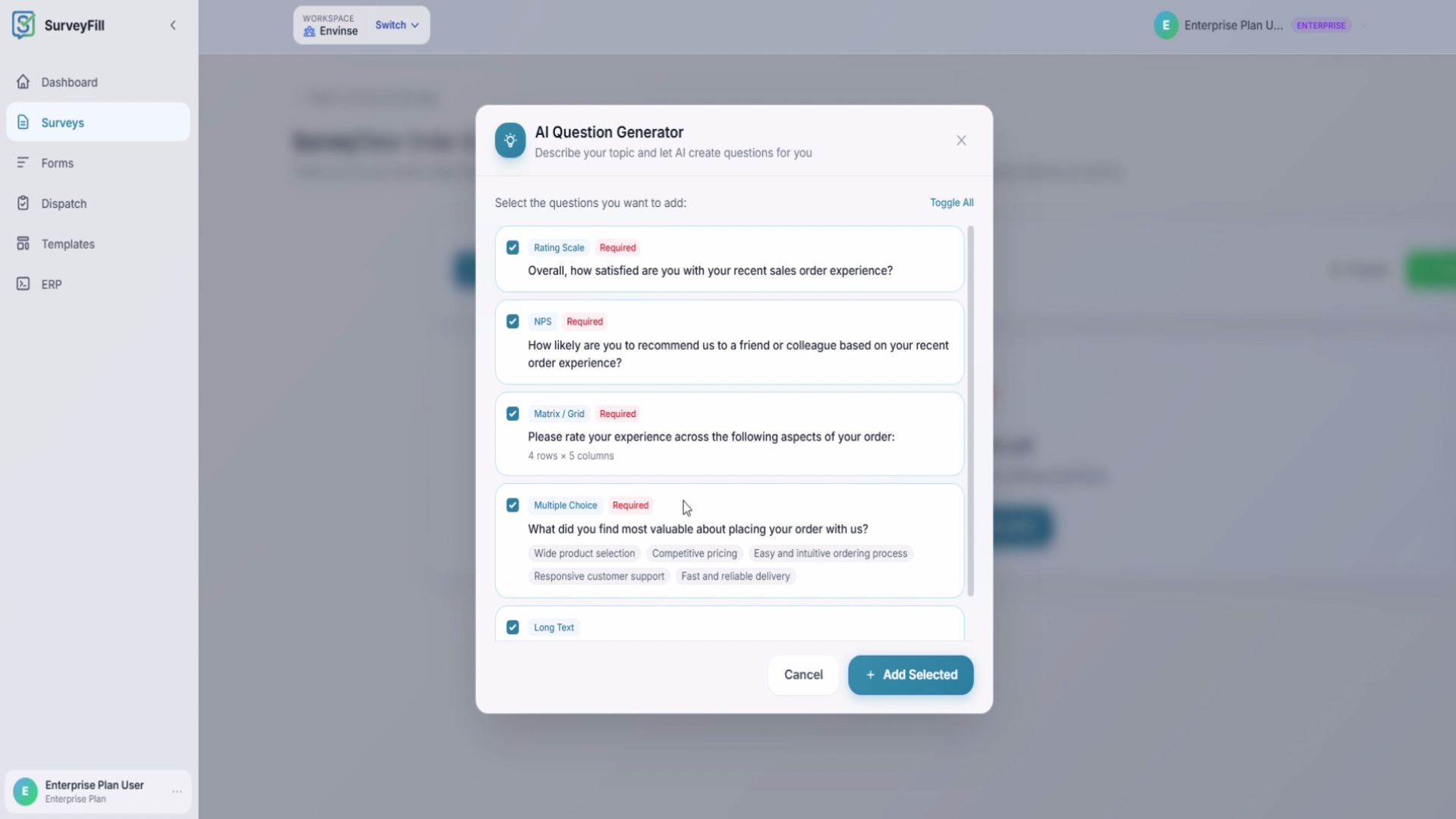
Start in SurveyFill. Instead of building questions from a blank page, describe your topic - for example, New Sales Order Experience - and the AI question generator creates a ready-to-use set. It can include a satisfaction rating, NPS question, experience grid, multiple-choice question, and open-ended follow-up, each mapped to the appropriate question type.
Preview exactly what respondents will see, refine the questions if needed, and publish the survey.
Step 2: Connect SurveyFill to Acumatica
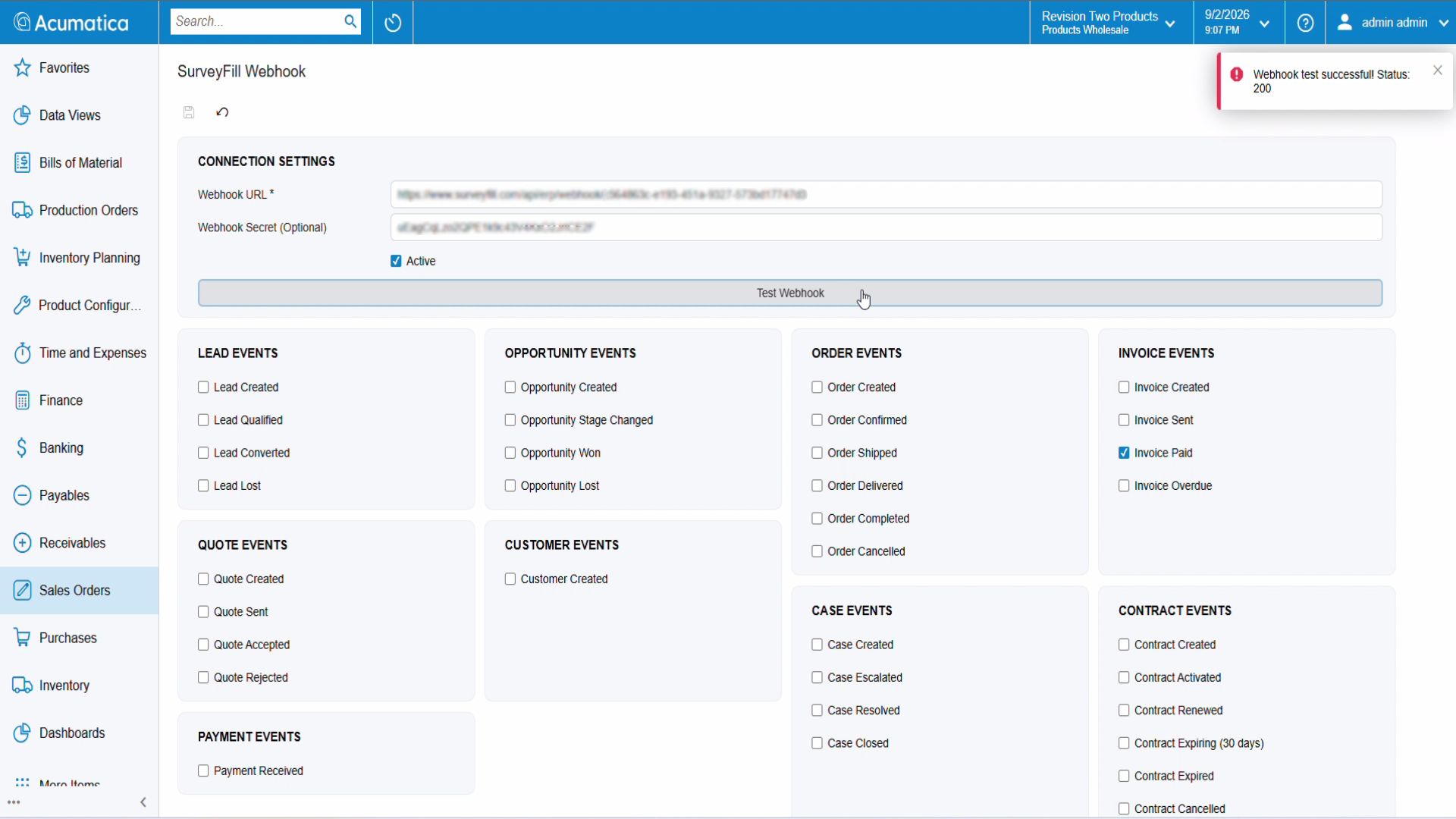
Next, link the two systems. In SurveyFill, create an ERP connection, choose Acumatica as the provider, and generate a secure webhook secret. Acumatica sends the secret with each request so SurveyFill can verify its source.
After you enter the Acumatica instance details, SurveyFill provides a webhook URL and setup instructions. Add those values in Acumatica, activate the connection, and run a test. A Webhook test successful - Status: 200 notification confirms the two systems can communicate.
Step 3: Set the Rules for Sending and Syncing
This is where the automation gets its intelligence, and it has two halves.
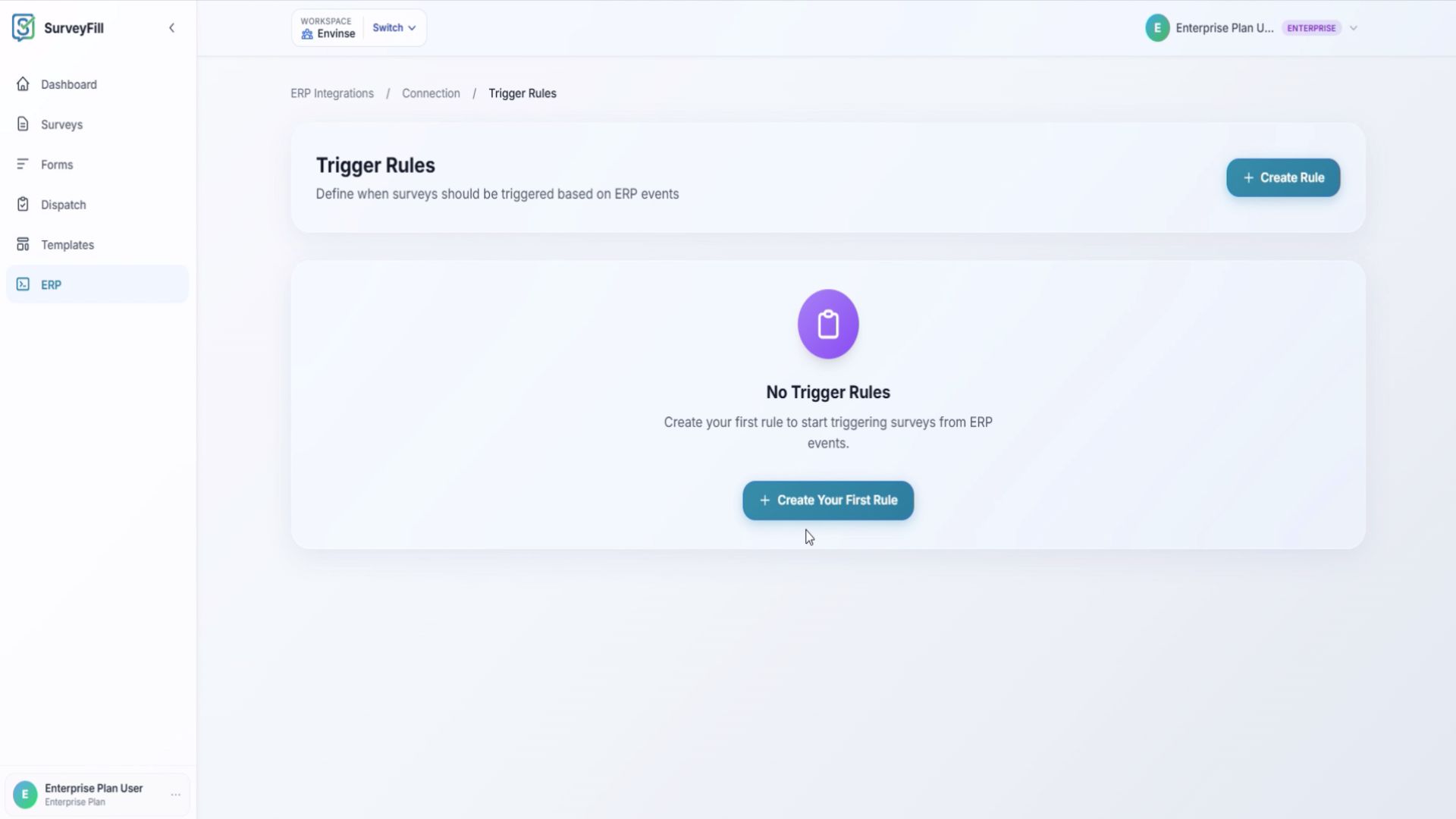
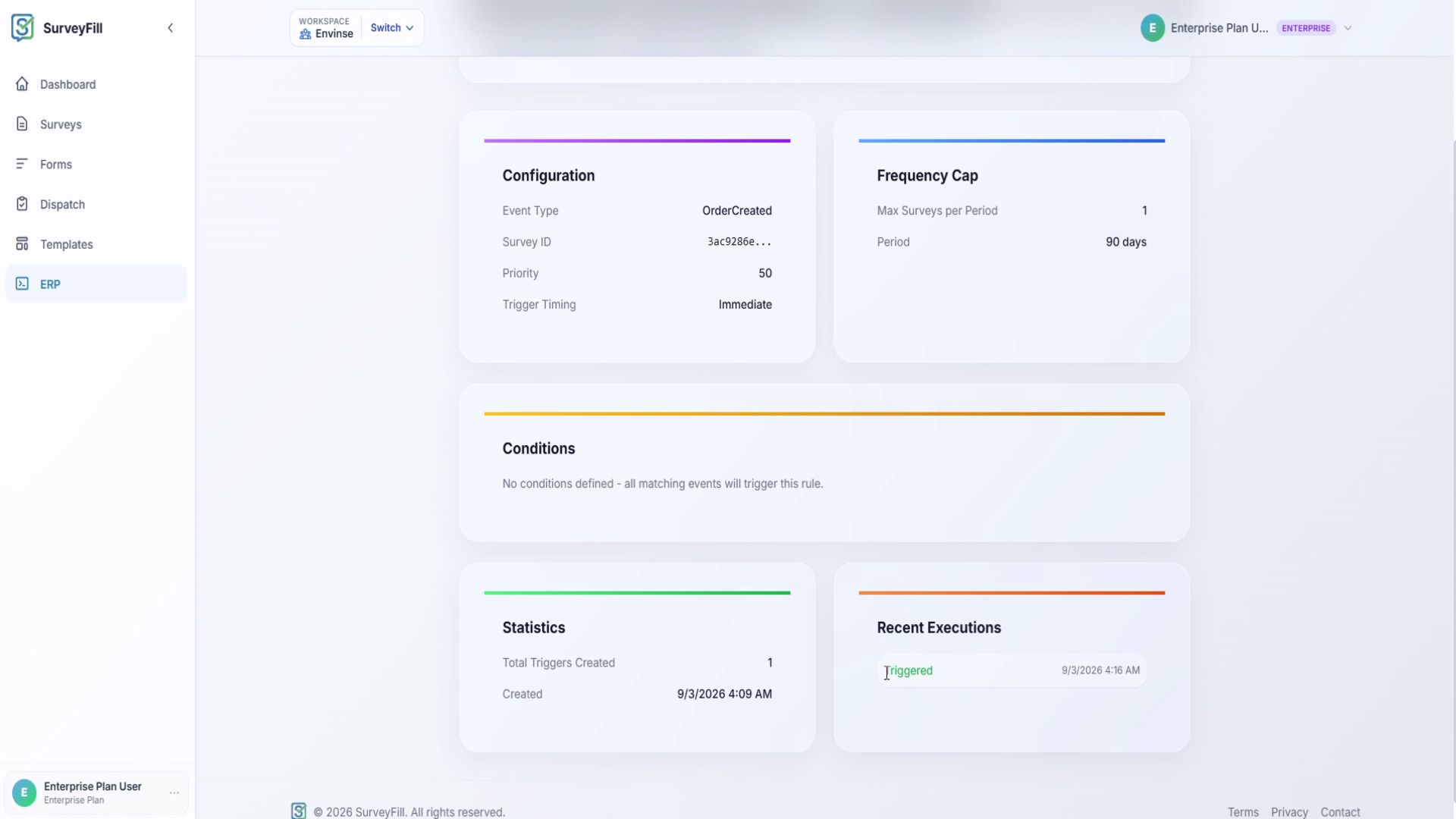
Trigger rules decide when a survey is sent. Pair an Acumatica event - such as Order Created - with the survey you want to send. You can trigger it immediately or add a delay, apply a frequency cap to avoid over-surveying the same customer, and add conditions such as a minimum order value.
Response sync decides where answers return. Map each survey question to the corresponding field on the Acumatica record. Every response then flows back to the originating sales order instead of remaining isolated in a separate application.
Step 4: Watch the Automation Run
With the connection and rules configured, the workflow runs itself. When a new sales order is created in Acumatica, the ERP fires the selected event and SurveyFill records the trigger execution.
The customer receives the survey invitation, opens the survey you built, rates the experience across areas such as product quality, support, ease of purchase, and delivery, adds a comment, and submits. No one on your team has to send or track the request manually.
Step 5: Get Insight Where You Already Work
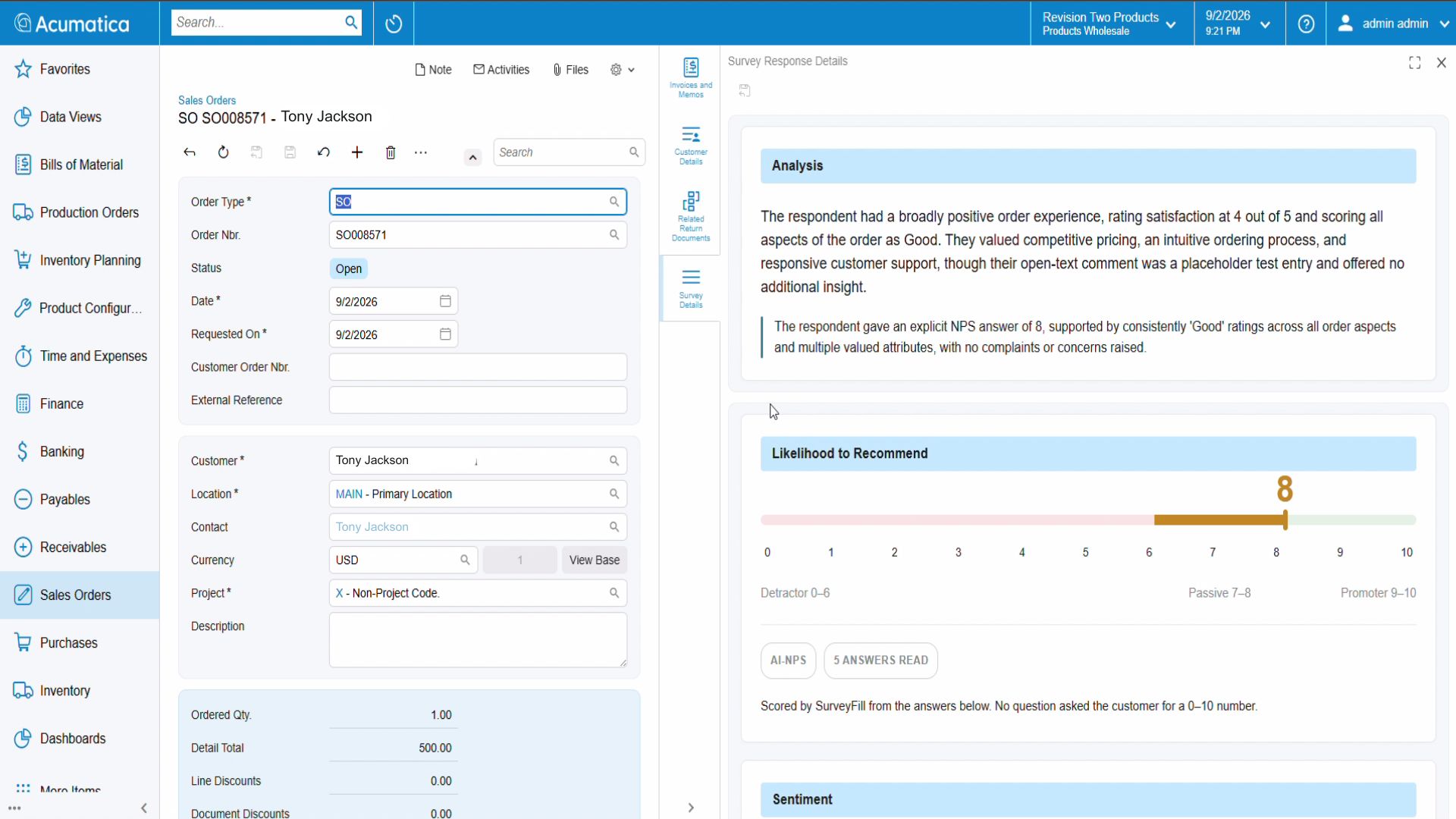
Here is the payoff. The completed response returns to the original sales order on a dedicated Survey Responses tab. SurveyFill's AI has already performed the first read: it summarizes the response in plain language, scores the NPS, tags key themes, and suggests next steps without making the user leave Acumatica.
Sales and service teams see the feedback in context, next to the order it describes, ready to act on.
The Business Value of Closing the Feedback Loop
Connecting SurveyFill and Acumatica creates a closed feedback loop between sales operations and customers:
- Feedback is captured automatically. The process no longer depends on someone remembering to send a survey.
- Responses stay in context. Answers are attached to the order and customer rather than stranded in another tool.
- Teams get faster, clearer reads. AI summaries, NPS scoring, themes, and suggested actions provide a useful first pass.
- Manual work falls away. From order event to customer insight, the configured process runs on its own.
Built Around How Your Business Actually Works
This workflow is one example. In practice, the ERP events, surveys, delay rules, conditions, and field mappings should match each business. You might trigger after delivery instead of order creation, use a different survey by order type, or route low scores into a service-recovery workflow. See the companion SurveyFill + Acumatica customer feedback case study for the business fit, benefits, and complete order-to-insight flow.
That is where Envinse comes in. We do more than connect two systems: we design Acumatica integrations around the operation, so the feedback collected fits the way the team works. We can also extend the workflow with AI inside Acumatica when the requirements go beyond response summarization.
Frequently Asked Questions
What is SurveyFill?
SurveyFill is a survey and customer-feedback platform for building, publishing, and managing surveys. It includes AI question generation and AI-powered response analysis, including NPS scoring and theme tagging.
How does the SurveyFill and Acumatica integration work?
A secure webhook connects the two systems. When a chosen event occurs in Acumatica, SurveyFill automatically sends the matching survey. Completed responses sync back to the originating Acumatica record with an AI-generated summary.
Can I control when surveys are sent?
Yes. Trigger rules let you choose the ERP event, send immediately or after a delay, cap how often the same customer is surveyed, and add conditions such as a minimum order value.
Do I need to leave Acumatica to see responses?
No. Responses and their AI analysis appear on a Survey Responses tab directly on the related Acumatica record.
Is every implementation the same?
No. Envinse configures the triggers, surveys, and field mappings around each customer's requirements and order lifecycle.
Turn Everyday Orders Into Actionable Customer Insight
Tell us when feedback should be requested and where your team needs the answers. We will map the SurveyFill + Acumatica workflow and return a fixed-price scope.
Discuss Your Acumatica Integration →